
Start with the API-first developer guide, then jump into the Visual Search plugin samples for ready-to-run UI integrations.
This guide shows, in plain language, how to call the public Visual Search endpoints so you can drop "similar items" widgets or discovery panels into your digital experiences. It complements the reference documentation at docs.okkular.io/api-guide.
Visual Search is Okkular's similarity service that looks at a product's analysed imagery and attributes, then recommends other catalogue items that "look" alike. Common uses include:
published flag is available only for Shopify integrations.
No knowledge of the internal platform is required-just an API key and the SKU you want to enrich.
https://api.okkular.io/v1x-api-key: <your key> (contact Okkular Support if you need one)You only need two endpoints in day-to-day builds:
| Purpose | HTTP call |
|---|---|
| Fetch visually similar items for a SKU | GET /visual-search/{sku} |
| Fetch the available categories/attributes so shoppers can filter | GET /visual-search/{sku}/categories |
GET /visual-search/{sku}/categories with the x-api-key header.filters JSON shown later in this guide.GET /visual-search/{sku}.filters value if the shopper chose any tags; otherwise omit it.default_list object in order of the position value and display the items.401/403, surface an authentication error and alert your operations team.404 Visual search not generated yet, fall back to popular items or hide the widget until processing completes.GET /visual-search/{sku}
Headers: x-api-key
Optional query: filters=<URL-encoded JSON>
Use this call to populate a carousel or recommendation zone. The service returns a JSON object named default_list where each key is a similar SKU and each value contains display-ready details like image, title, price, product link, and its ranking position.
Simple cURL example
curl "https://api.okkular.io/v1/visual-search/PD1081_10" \
  -H "x-api-key: <your-key>"
With filters applied
curl "https://api.okkular.io/v1/visual-search/PD1081_10?filters=%7B%22womens-cardigans-length%22:%22long%22%7D" \
  -H "x-api-key: <your-key>"
encodeURIComponent (or similar) before appending it to the URL.Response highlights
{
  "default_list": {
    "SKU123": {
      "image_link": "https://cdn.example.com/SKU123.jpg",
      "title": "Artier Structured Cropped Sweatshirt",
      "price": "92.00",
      "link": "https://shop.example.com/products/SKU123",
      "position": 0,
      "published": true
    },
    "SKU456": { "...": "..." }
  },
  "default_selection": {
    "womens-cardigans-length": "long"
  }
}
default_list: the items you should render in the exact order shown by the position property.default_selection: only present when you passed filters; use it to highlight which tags are active in your UI.default_list with HTTP 200 simply means "no matches for that filter".Common HTTP responses:
200 OK - results returned.404 Product not found. - SKU was never analysed or is misspelled.404 Visual search not generated yet. - analysis exists but similar items are still being prepared.401/403 - missing or invalid API key.GET /visual-search/{sku}/categories
Headers: x-api-key
Call this endpoint to learn which attributes can be used as filters for the selected SKU. Each entry includes the raw attribute name and an optional alias. Use the attribute names and tag values exactly as returned when you build the filters query for the main endpoint.
Example response
[
  {
    "category_name": "womens-cardigans-length",
    "alias_name": "Length",
    "attributes": [
      {"name": "long", "alias_name": "Longline"},
      {"name": "regular", "alias_name": null}
    ]
  },
  {
    "category_name": "womens-cardigans-sleeves",
    "attributes": [
      {"name": "sleeveless"},
      {"name": "half-sleeves"},
      {"name": "full-sleeves"}
    ]
  }
]
Typical use: load this list when the PDP or search page first renders, let the shopper pick the tags they care about, then call the main endpoint again with those selections encoded as filters.
| Element | Description |
|---|---|
| Method | GET |
| Path | /visual-search/{sku} |
| Path variable | sku = the product identifier exactly as it was uploaded to Okkular |
| Headers | x-api-key: <okkular api key> (required) |
| Query parameters | filters (optional, URL-encoded JSON) |
filters parameterThe Visual Search endpoint accepts one optional query parameter called filters. Its value must be URL-encoded JSON. The JSON structure is:
{
  "womens-cardigans-length": "long"
}
Guidelines:
/categories returned (case-insensitive, but lower-case everything for consistency).| Field | Type | Description |
|---|---|---|
default_list |
object | Map keyed by SKU. Each value contains the fields listed below. |
default_list[sku].image_link |
string | URL to the product image that should be displayed. |
default_list[sku].title |
string | Product name for merchandising copy. |
default_list[sku].price |
string | Price with currency as stored in metadata. |
default_list[sku].link |
string | URL to redirect shoppers to the PDP. |
default_list[sku].position |
integer | Zero-based rank showing the recommended ordering. |
default_list[sku].published |
boolean | Indicates whether the product is marked as published. The published flag is available only for Shopify integrations; unpublished items are filtered out before the response. |
default_selection |
object | Present only when you pass filters. Shows which attribute tags the backend applied. |
filters |
object | Echo of the filters stored with the neighbour record (mainly for debugging). Not guaranteed to exist. |
| Field | Type | Description |
|---|---|---|
category_name |
string | Attribute group name tied to the SKU's category. |
alias_name |
string or null | Tenant-defined friendly label (optional). |
attributes |
array | Each entry has name and optional alias_name. Use these to build your filters UI. |
async function fetchSimilarProducts({ sku, apiKey, filters }) {
  const params = new URLSearchParams();
  if (filters) {
    params.set('filters', encodeURIComponent(JSON.stringify(filters)));
  }
  const res = await fetch(`https://api.okkular.io/v1/visual-search/${sku}?${params}`, {
    headers: { 'x-api-key': apiKey }
  });
  if (!res.ok) throw new Error(`Visual search failed: ${res.status}`);
  return res.json();
}

// Example usage
fetchSimilarProducts({
  sku: 'PD1081_10',
  apiKey: window.OKKULAR_API_KEY,
  filters: {
    'womens-cardigans-length': 'long'
  }
}).then(renderCarousel);
OkHttpClient client = new OkHttpClient();

String filtersJson = URLEncoder.encode(
  "{\"womens-cardigans-length\":\"long\"}",
    StandardCharsets.UTF_8);

Request request = new Request.Builder()
    .url("https://api.okkular.io/v1/visual-search/PD1081_10?filters=" + filtersJson)
    .header("x-api-key", System.getenv("OKKULAR_API_KEY"))
    .build();

try (Response response = client.newCall(request).execute()) {
    if (!response.isSuccessful()) {
        throw new IOException("Unexpected code " + response);
    }
    String body = response.body().string();
    System.out.println(body);
}
$apiKey = getenv('OKKULAR_API_KEY');
$sku = 'PD1081_10';
$filters = urlencode(json_encode([
  'womens-cardigans-length' => 'long'
]));

$ch = curl_init("https://api.okkular.io/v1/visual-search/$sku?filters=$filters");
curl_setopt_array($ch, [
    CURLOPT_HTTPHEADER => ["x-api-key: $apiKey"],
    CURLOPT_RETURNTRANSFER => true,
]);

$response = curl_exec($ch);
if (curl_errno($ch)) {
    throw new Exception(curl_error($ch));
}
curl_close($ch);

$data = json_decode($response, true);
print_r($data['default_list']);
Feel free to adapt these snippets to your preferred HTTP client-the only requirements are the base URL, the x-api-key header, and (optionally) the URL-encoded filters JSON.
| HTTP Code | Scenario | Action |
|---|---|---|
| 200 | Success, even if default_list is empty |
Render results or show a "no matches" state. |
| 400 | Malformed filters JSON results in an empty result set (200 OK) |
Ensure you JSON-stringify then URL-encode the payload before sending. |
| 401 / 403 | Missing or invalid x-api-key |
Refresh the key from the Okkular dashboard and redeploy secrets. |
| 404 Product not found | SKU is unknown in Okkular | Confirm the SKU was uploaded and analysed (analysis_status >= 1). |
| 404 Visual search not generated yet | Similarity graph doesn't exist yet | Wait for overnight processing or contact support to trigger regeneration. |
| 500 | Unexpected error (DynamoDB, Elasticsearch, etc.) | Retry with backoff, log the request ID, and raise a ticket if it persists. |
Additional validations performed automatically:
SIMILAR_PRODUCTS_LIMIT), preventing oversized responses.position field for the visual results subset.position field when ordering the carousel; do not sort alphabetically./categories call to power your filter UI, then plug those selections into /visual-search/{sku}.support@okkular.io if you need higher rate limits, extra filter options, or help diagnosing responses.Happy building!
Javascript, jQuery, and PHP code to call the Visual Search filter API. Use these samples to build your own UI and logic for visual search.
var data = null;
var xhr = new XMLHttpRequest();
xhr.open("GET", "https://api.okkular.io/v1/feed/59632/filters");
xhr.setRequestHeader("content-type", "application/json");
xhr.setRequestHeader("x-api-key", "*******b0fb159f2a2dc92d5a22c1b9de1afcc84a6deb*********");
xhr.send(data);
var params = {
"async": true,
"crossDomain": true,
"url": "https://api.okkular.io/v1/feed/59632/filters",
"method": "GET",
"headers": {
"content-type": "application/json",
"x-api-key": "*******b0fb159f2a2dc92d5a22c1b9de1afcc84a6deb*********",
}
}
$.ajax(params).done(function (response) {
console.log(response);
});
<?php
$request = new HttpRequest();
$request->setUrl('https://api.okkular.io/v1/feed/59632/filters');
$request->setMethod(HTTP_METH_GET);
$request->setHeaders(array(
'postman-token' => 'b67f7151-d703-efa0-ba2c-446905778db2',
'cache-control' => 'no-cache',
'x-api-key' => '*******b0fb159f2a2dc92d5a22c1b9de1afcc84a6deb*********',
'content-type' => 'application/json'
));
try {
$response = $request->send();
echo $response->getBody();
} catch (HttpException $ex) {
echo $ex;
}
?>
Integrate visual search into your web application by using the example code below.
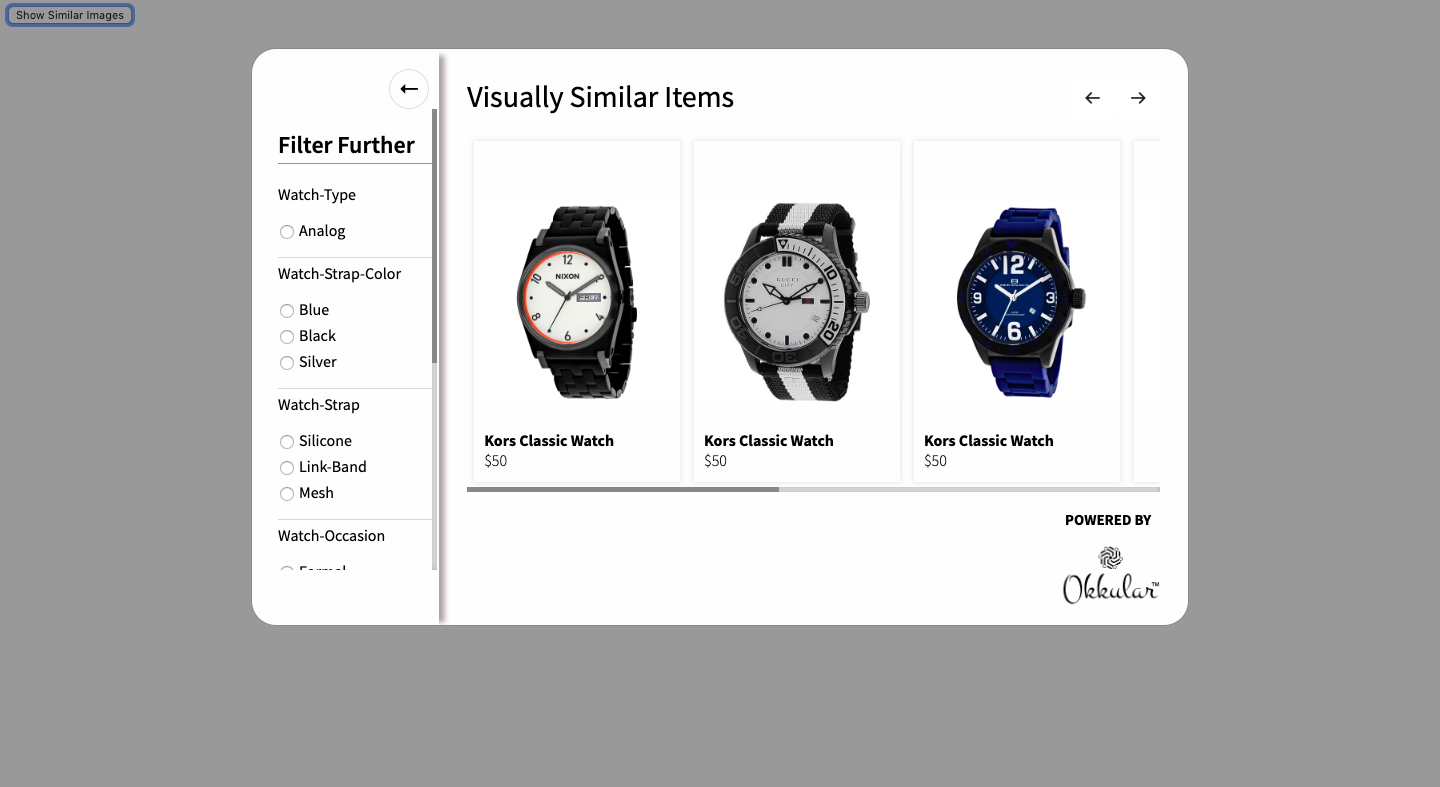
<!-- Place this before closing </body> tag -->
<div class="hybrid-modal-body"></div>

<!-- Example button to call Visual Search plugin -->
<button type="button" class="btn btn-primary" onclick="callHybrid(59632)">Show Similar Images</button>
<!-- Place in <head> section -->
<link rel="stylesheet" href="https://s3-us-west-2.amazonaws.com/hybrid-plugin-resources/hybridplugin.css" type="text/css"/>
// Place scripts at the bottom of the page
<script src="https://ajax.googleapis.com/ajax/libs/jquery/3.3.1/jquery.min.js"></script>
<script type="text/javascript" src="https://s3-us-west-2.amazonaws.com/hybrid-plugin-resources/hybridplugin-minified.js"></script>

// Configuration function
let config = () => {
  return new Promise(function(resolve, reject){
    var config_object = {
      currency: '$',
      pugintitle: 'Similar Styles',
      okkularlogo: false
    };
    resolve(config_object);
  });
}

// Metadata function
let getMetaData = (skuList) => {
  return new Promise(function(resolve,reject){
    const metadata = [];
    metadata.push(
      { sku: 'OC2116', product_price: '$34', product_name: 'Michael Kors Classic Watch' },
      { sku: 'OC2715', product_price: '$50', product_name: 'Kors Classic Watch' },
      { sku: 'A954-2357', product_price: '$50', product_name: 'Kors Classic Watch' },
      { sku: 'YA126243', product_price: '$50', product_name: 'Kors Classic Watch' }
    );
    resolve(metadata);
  });
}

// Call Visual Search filter function
function callHybrid(sku){
  var api_key = '***api key*****';
  HybriDResults.init([sku, api_key, config, getMetaData]);
  HybriDResults.ResultsHybrid();
}
        // This block ensures that the code is executed after the document is fully loaded.
        $(document).ready(function () {
          /* Insert Modal into Page */
          $("body").append('<div class="hybrid-modal-body"></div>');

          // Initiating the Okkular visual search plugin.
          /* You could modify button as per your need */
          var visual_search_button =
            '<button data-visual-search onclick="VisualSearch.showSimilar()" class="_okkular_similar_view_button">Similar Styles</button>';

          /* Place your API Key */
          var api_key =
            "0d740541b338c-xxxxx-xxxxx-xxxx";

          // Place your storefront access token to execute the graphql using storefront api.
          var VISUAL_SEARCH_STOREFRONT_ACCESS_TOKEN = 'xxxxxxxx';

          /* DYNAMIC_VALUE: product sku */
          var my_sku = "6869653717126";

          let updateProductDetailsInRealTime = (skuList) => {
            return new Promise(function (resolve, reject) {
              // Array that will hold list of metadata objects.
              const metadata = [];
              if (skuList.length !== 0) {
                var gql_sku_list = [];
                // Formatting the list of sku's in graphql format.
                gql_sku_list = skuList.map(
                  (sku) => '"' + btoa(`gid://shopify/Product/${sku}`) + '"'
                );

                /**
                * GraphQL query to fetch product's metadata of given SKUs.
                * Using ProductPricing @inContext(country: ${Shopify.country})
                * to fetch price based on market price for the country name passed to the query.
                */
                const query = `
                  query ProductPricing @inContext(country: ${Shopify.country}){
                    nodes(ids: [${gql_sku_list.toString()}]) {
                      ...on Product {
                        id
                        title
                        totalInventory
                        availableForSale
                        handle
                        priceRange {
                          minVariantPrice {
                            amount
                          }
                          maxVariantPrice {
                            amount
                          }
                        }
                        variants(first: 1) {
                          edges {
                            node {
                              id
                              title
                              priceV2 {
                                amount
                                currencyCode
                              }
                            }
                          }
                        }
                      }
                    }
                  }
                `;

                /**
                * Function to make AJAX call to graphql.json.
                */
                function queryGraphQL(query) {
                  return fetch(`https://${window.location.host}/api/2021-07/graphql.json`, {
                    method: "POST",
                    headers: {
                      "Content-Type": "application/graphql",
                      "Access-Control-Origin": "*",
                      "X-Shopify-Storefront-Access-Token": VISUAL_SEARCH_STOREFRONT_ACCESS_TOKEN,
                    },
                    body: query,
                  }).then((response) => response.json());
                }

                /**
                * Calling queryGraphQL() function to load product metadata.
                */
                queryGraphQL(query).then((response) => {
                  for (let k = 0; k < response.data.nodes.length; k++) {
                    if (response.data.nodes[k] !== null) {
                      // If you want to show or hide visually similar product based on availability or status of the product,
                      // they can manage that thing here like below.
                      let product_status = "active";

                      // If you always want your product to show despite it is available for sale or not then remove or comment the below if-else statement.
                      if (response.data.nodes[k].availableForSale) {
                        product_status = "active";
                      } else {
                        product_status = "inactive";
                      }

                      // Defaulting the total Inventory to 1 to show on the popup. Update this dynamically if you want to show and hide bases on availablity and non-availablity.
                      response.data.nodes[k].totalInventory = 1;

                      // Pushing metadata per product in the list.
                      // Modify product_url given below if the product URL changes as per specific market or country.
                      metadata.push({
                        sku: skuList[k],
                        product_price: response.data.nodes[k]["priceRange"]["maxVariantPrice"]["amount"],// Modify as what price you want to show
                        product_name: response.data.nodes[k].title,
                        product_url: "https://" + window.location.host + "/products/" + response.data.nodes[k].handle, // Modify product URL if URL fromation is different for you.
                        product_inventory: response.data.nodes[k].totalInventory,
                        product_status: product_status,
                      });
                    }
                  }

                  if (metadata.length !== 0) {
                    resolve(metadata);
                  }
                });
              }
            });
          };

          // Configuration function. Here you could set values for currency, plugintitle and okkularlogo.
          let config = () => {
            return new Promise(function (resolve, reject) {
              var confarray = {};
              confarray = {
                currency: "$",
                pugintitle: "Similar Styles",
                okkularlogo: false,
              };
              resolve(confarray);
            });
          };

          // Here we pass updateProductDetailsInRealTime as a callback function that overrides the product metadata in real-time.
          VisualSearch.init([my_sku, api_key, config, updateProductDetailsInRealTime])
            .then(function (hasdata) {
              if (hasdata) {
                /* Replace 'selector_to_append_button' with your selector where you want button to appear */
                $(".product-img-box").append(visual_search_button);
                $("._okkular_similar_view_button").css("display", "block");
              } else {
                $("._okkular_similar_view_button").css("display", "none");
              }
            })
            .catch(function (reason) {
              $("._okkular_similar_view_button").css("display", "none");
            });
        });